
Starbucks Partner Hub: Login, Features & Help (2026)
The Starbucks Partner Hub is Starbucks’ internal website for its employees, called partners, where they find company news, HR policies, and links to work tools such as Partner Central and benefits resources. Partners sign in with a Global Username (country code plus partner number) through Starbucks’ secure sign-in page. The Partner Hub is only available to current Starbucks partners.
You need something from the Starbucks Partner Hub, such as a policy, a benefits link, or a way into Partner Central, and you either can’t sign in or can’t find what you need. This guide explains what the Partner Hub is, how to sign in without getting locked out, and which Starbucks tool handles which task. It also covers what to do when something breaks. Where Starbucks has published something, we link to it; where it hasn’t, we say so.
What Is the Starbucks Partner Hub?
The Starbucks Partner Hub is the internal web portal Starbucks provides to its employees, whom the company calls partners. It gathers company news, HR resources, policy documents, and links to other partner tools behind one secure sign-in. Starbucks refers partners to the Partner Hub for official documents such as the Employment Privacy Notice and for information on programs like DACA support.
Two Starbucks references show what the Partner Hub is used for:
- Privacy. Starbucks’ job applicant privacy statement (revised July 1, 2026) says current partners can read the Employment Privacy Notice on My Partner Info or the Partner Hub.
- Program information. A 2024 Starbucks message to U.S. partners pointed them to the Partner Hub to learn how Starbucks supports partners who are DACA recipients.
A note on accuracy
many guides, including an older version of this page, describe the Partner Hub as the place to “do everything,” from swapping shifts to downloading W-2s. Starbucks’ own materials show those tasks are spread across several connected tools. The table in the next section shows which one does what.
Partner Hub vs. Partner Central, My Partner Info, and the Scheduling App
The Partner Hub is the starting point, but several Starbucks tasks happen in separate, connected tools. Partner Central handles pay statements, sick and vacation balances, and time-off entry, according to Starbucks’ benefits site. My Partner Info (MPI) holds personal and pay records and uses its own login format. Shifts are viewed in the scheduling app or on the posted schedule.
| Task | Where it happens | How we know |
|---|---|---|
| Company news, policies, HR documents | Partner Hub | Starbucks privacy statement; Starbucks partner messages |
| View pay statement | Partner Central | Starbucks benefits site |
| Vacation and sick balances | Partner Central | Starbucks benefits site |
| Enter time off | Partner Central | Starbucks benefits site |
| Personal and pay records | My Partner Info (MPI) | MPI login help page |
| Availability preferences | Partner Preferences (myavailability.starbucks.com) | Official Starbucks page titled “Starbucks Partner Preferences”; feature details not public |
| View shifts | Scheduling app or posted schedule | Varies by store [confirm with store leader] |
| Benefit plan details | starbucksbenefits.com | Official site sponsored by Starbucks |
| HR help | Partner Contact Center | Starbucks benefits site |
Partner Hub vs. the Partner App. Starbucks has publicly referred to both “Partner Hub” and “the Partner App.” In November 2023 it announced upgrades to both, including a personalized benefits-status view available on the web and in the Partner App for eligible partners. How the app is installed today varies.
How to Sign In to the Starbucks Partner Hub
Starbucks partners sign in to the Partner Hub with their Global Username and password on Starbucks’ secure sign-in page. Starbucks’ sign-in page defines the Global Username as the two-letter country code followed by the partner number, for example US21344879. New partners use the page’s “One-Time Password” option, and verification can run through the SecureAuth OTP app.
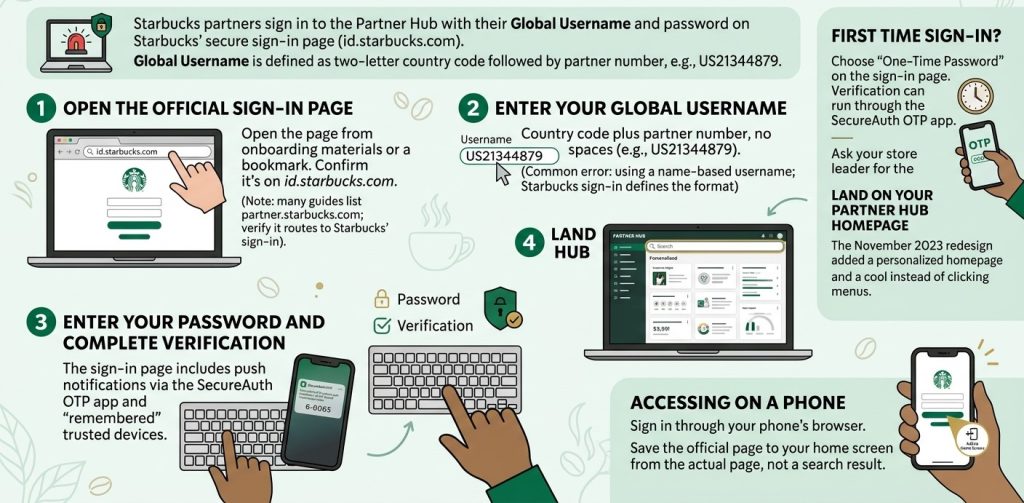
Steps:
- Open the official sign-in page from your onboarding materials or a bookmark saved from them. Starbucks’ Partner Hub sign-in page is hosted on
id.starbucks.com. Many guides listpartner.starbucks.comas the starting address[VERIFY: confirm it still routes to Starbucks' sign-in]. - Enter your Global Username: country code plus partner number, with no spaces (e.g., US21344879).
- Most common error here: using a name-based username. Some guides claim the format is “first initial + last name + numbers.” Starbucks’ own sign-in page shows the country-code format.
- Enter your password and complete verification. The sign-in page mentions push notifications through the SecureAuth OTP app and “remembered” trusted devices.
- Land on your Partner Hub homepage. Starbucks said the November 2023 redesign added a personalized homepage and better search. Use search to find a policy or tool rather than clicking through menus.
First time? Choose “One-Time Password” on the sign-in page. The page also references a Global Username Quick Reference Guide; ask your store leader for it.
On a phone: you can sign in through your phone’s browser. Saving the page to your home screen is a convenience, but save it from the official page, not from a search result.
What You Can Find Inside the Partner Hub
The Starbucks Partner Hub is where partners find company information and links to Starbucks’ other work tools. Starbucks’ own materials confirm it hosts the Employment Privacy Notice and program information such as DACA support. Many partner guides also report links to Partner Central, benefits resources, and learning content. Exact menus change over time, so use the Hub’s built-in search.
| Item | Status | Notes |
|---|---|---|
| Employment Privacy Notice | Confirmed by Starbucks | Also available in My Partner Info |
| Program information (e.g., DACA support) | Confirmed by Starbucks (2024) | |
| Personalized homepage, navigation, search | Confirmed by Starbucks (Nov. 2023 redesign) | |
| Benefits-status view | Announced by Starbucks for December 2023 | Web and Partner App, eligible partners |
| Links to Partner Central, benefits, schedules | Widely reported by partner guides | [VERIFY: menu names] |
| Training and learning content | Reported by partner guides | [UNVERIFIED: NEEDS SOURCE] |
Why You Can’t Log In to the Partner Hub: Quick Fixes
Most Partner Hub sign-in failures come from a wrong username format, a password problem, a verification-device issue, or an outdated bookmark. Start by confirming your Global Username format, then reset your password if needed. If you’re locked out, contact the Partner Contact Center at (888) SBUX-411 rather than retrying. Repeated failures on Starbucks systems can lock your account.
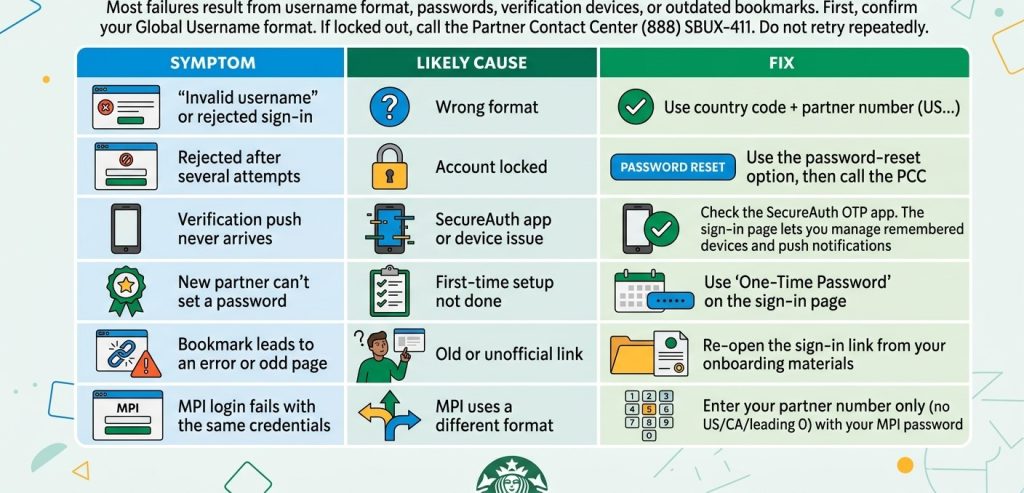
| Symptom | Likely cause | Fix |
|---|---|---|
| “Invalid username” or rejected sign-in | Wrong format | Use country code + partner number (US…) |
| Rejected after several attempts | Account locked | Use the password-reset option, then call the PCC |
| Verification push never arrives | SecureAuth app or device issue | Check the SecureAuth OTP app. The sign-in page lets you manage remembered devices and push notifications. |
| New partner can’t set a password | First-time setup not done | Use “One-Time Password” on the sign-in page |
| Bookmark leads to an error or odd page | Old or unofficial link | Re-open the sign-in link from your onboarding materials |
| MPI login fails with the same credentials | MPI uses a different format | Enter your partner number only (no US/CA/leading 0) with your MPI password |
Still stuck?
For HR questions including Partner Central, Starbucks’ benefits site lists the Partner Contact Center at (888) SBUX-411, which is (888) 728-9411. Your store leader can help with store-level access.
Stay Safe: Official Starbucks Partner Addresses
Only enter your Starbucks credentials on official Starbucks pages. Some ranking websites show boxes asking for your Global Username or Network ID on their own pages, which is a phishing risk even when the site means well. The addresses below are ones we confirmed belong to Starbucks. No independent site, including this one, needs your credentials.
| Address | What it is | Verified |
|---|---|---|
id.starbucks.com | Starbucks’ sign-in page titled “Starbucks Partner Hub” | Yes |
partnercentral.starbucks.com | Partner Central sign-in | Yes |
mypartnerinfo-ext.starbucks.com | My Partner Info | Yes |
myavailability.starbucks.com | “Starbucks Partner Preferences” sign-in | Yes |
starbucksbenefits.com | Benefits information site sponsored by Starbucks | Yes |
When NOT to sign in:
- A site that isn’t on Starbucks’ domains asks for your password.
- A link arrived by text, social media, or a search ad.
- Someone offers to “check your schedule” for you using your credentials.
Can Former Starbucks Partners Use the Partner Hub?
The Starbucks Partner Hub is designed for current partners, and Starbucks’ sign-in pages are for active accounts. Former partners who need pay or tax records should contact the Partner Contact Center. A Starbucks partner recognition site directs current and former U.S. and Canada partners looking for a W-2 or T-4 to call the PCC at 888-728-9411.
We couldn’t confirm exactly when access ends after separation. If you’re leaving Starbucks, download your pay statements before your last day, while you still have access.
How the Partner Hub Has Changed
The Starbucks Partner Hub was redesigned in November 2023. Starbucks said the new version added a personalized homepage, more intuitive navigation, and better search. It also announced a personalized benefits-status view for December 2023 on the web and the Partner App. Many screenshots and guides online predate that redesign.
| Date | Change | Source |
|---|---|---|
| November 2023 | New Partner Hub launches: personalized homepage, navigation, search | Starbucks investments infographic |
| December 2023 | Personalized benefits-status view (web and Partner App, eligible partners) | Same |
| 2024 | Starbucks directs partners to the Partner Hub for DACA support information | Starbucks message to U.S. partners |
| July 1, 2026 | Starbucks privacy statement confirms the Employment Privacy Notice is on the Partner Hub | Starbucks job applicant privacy statement |
Next Steps
Bookmark the Partner Hub sign-in from your onboarding materials, and confirm your Global Username is in the country-code format. Use the Hub’s search to find policies and links. For pay stubs and time off, go to Partner Central. For shifts, use your scheduling app or the posted schedule. For anything account-related you can’t fix, call the Partner Contact Center.